Flow Summary
This page gives you the complete onboarding pipeline in a single view — from the customer’s first mobile OTP (One-Time Password) to the moment their account status changes to “ACTIVE” and they can place their first trade. If you are a new engineer, read this page after the Design Principles and before diving into the individual screen specifications. It will give you the end-to-end mental model that ties everything together: the 9-screen user journey, the maker-checker review (dual-control quality gate per SEBI requirements), and the multi-agency batch processing (the period where the system registers the customer with every exchange and depository).
User Journey (9 Screens)
Section titled “User Journey (9 Screens)”The flow below shows each screen, the fields the customer provides, and the background operations that fire at each step. Background operations are strategically placed to complete before the data is needed.
Screen 1: Mobile / Email Registration (1 field: mobile + OTP)    |--> ASYNC: Device Intelligence [Device Verification]
Screen 2: Enter PAN + DOB (2 fields)    |--> ASYNC: PAN Verify, KRA Lookup, CKYC Search, AML Screen
Screen 3: DigiLocker Consent (redirect, 0 fields)    |--> Harvests: Name, DOB, Gender, Photo, Address, Father's Name, PAN
Screen 4: Confirm Identity (1 field: email)    |--> Mobile already verified from Screen 1
Screen 5: Bank Account (3 fields: account no, IFSC, type)    |--> ASYNC: Penny Drop [Bank Verification], IFSC Lookup, OCR [Document Processing]
Screen 6: Trading Preferences (segment toggles)    |--> ASYNC: Income verification [Income Verification Provider] (if F&O/Commodity)
Screen 7: Nominations (add nominee or opt-out)
Screen 8: Declarations (checkboxes) + BLOCKING GATE
Screen 9: Review + Face Match [Biometric Verification] + Aadhaar OTP e-Sign [eSign Provider]Once the customer completes Screen 9, the application enters the internal review pipeline. The customer does not see or interact with this phase — they receive a notification when their account is active.
Maker-Checker Review (Dual Control)
Section titled “Maker-Checker Review (Dual Control)”- Maker (Step 10): Reviews application data, flags discrepancies against regulatory database responses
- Checker (Step 11): Independent verification and final approval before batch submission per SEBI dual-control requirements
After the checker approves, the system triggers 8 independent batch pipelines. Each pipeline registers the customer with a different regulatory agency or exchange. They run in parallel because none of them depend on each other’s output.
Batch Zone (Parallel Agency Pipelines)
Section titled “Batch Zone (Parallel Agency Pipelines)”After checker approval, 8 pipelines run in parallel:
| Pipeline | Submission | Processing | Result | Timeline |
|---|---|---|---|---|
| KRA | Submit | Under Process | Registered / Validated | 2-3 days |
| CKYC | Upload | Queued / Validated | KIN Generated | 4-5 days |
| NSE | UCC Submit | PAN Verify | Approved / Trading Active | Same day |
| BSE | UCC Submit | 3-Param PAN Verify | Approved / Segments Live | Same day |
| MCX | UCC Submit | Income Verify | Approved | Next working day |
| CDSL | BO File | KYC Check / Bank Valid | Active | 1-2 hrs (API) |
| NSDL | UDiFF Submit | CDS Process / DPM Update | Active | ~15 days |
| Income | Income Verification | - | Confirmed | 1-2 hrs |
The final gate determines when the customer’s account status changes to “ACTIVE” and they receive the notification that they can trade.
Final Gate
Section titled “Final Gate”Total time to active: 24-72 hours (limited by KRA/NSDL processing)
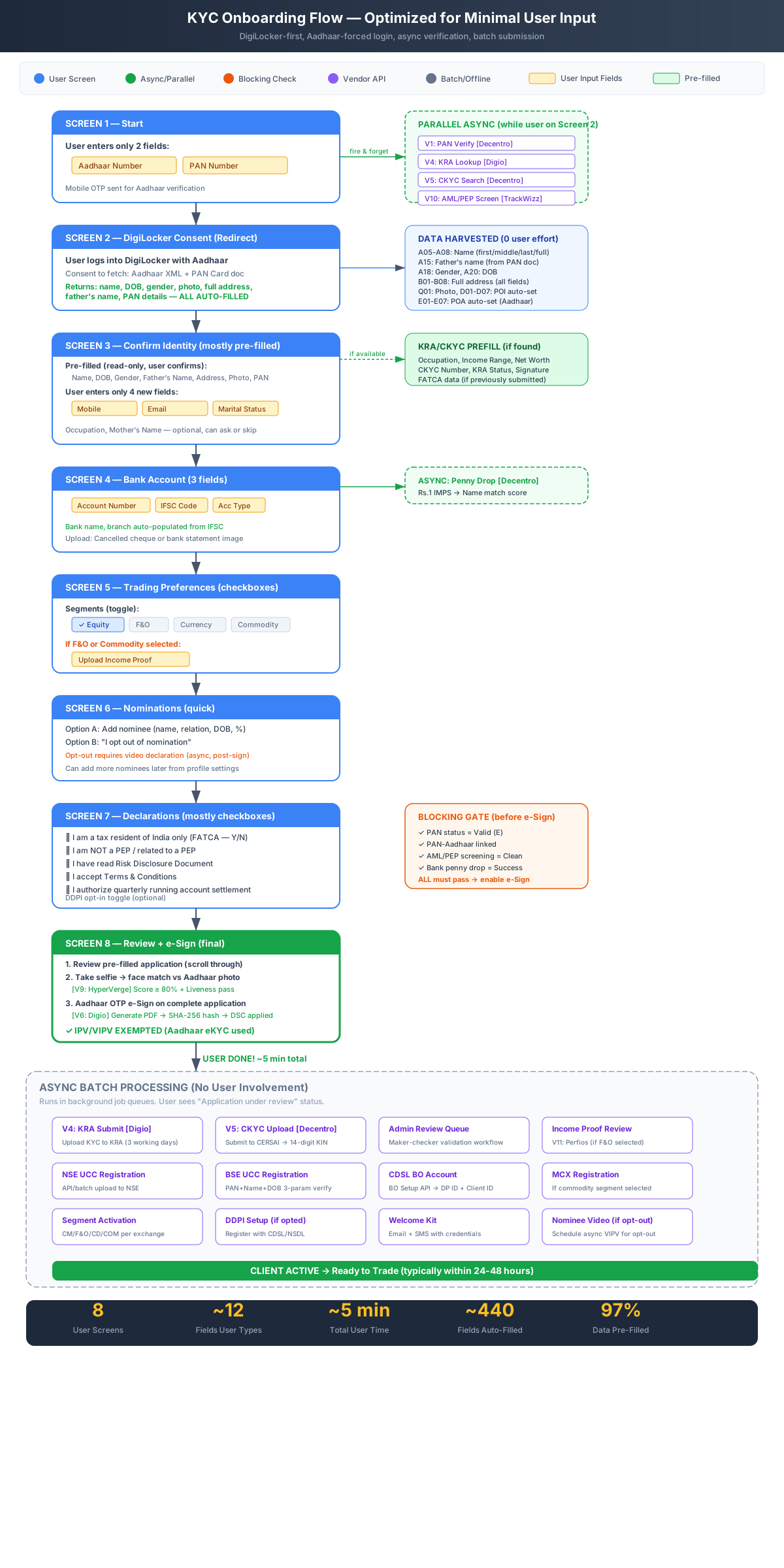
Figure 1: Complete Onboarding Flow