Status Machine
Every application in the KYC (Know Your Customer) system has a status — a single value that tells you exactly where it stands in the pipeline. If a customer calls asking “when can I trade?”, the status is the first thing you look up. If a batch pipeline fails, the status tells you which applications are stuck and where. If a compliance audit asks “how many applications are pending review?”, the status gives you the answer. This page documents all 12 possible states, the transitions between them, and the triggers that cause each transition. Think of it as the state machine that governs the entire application lifecycle.
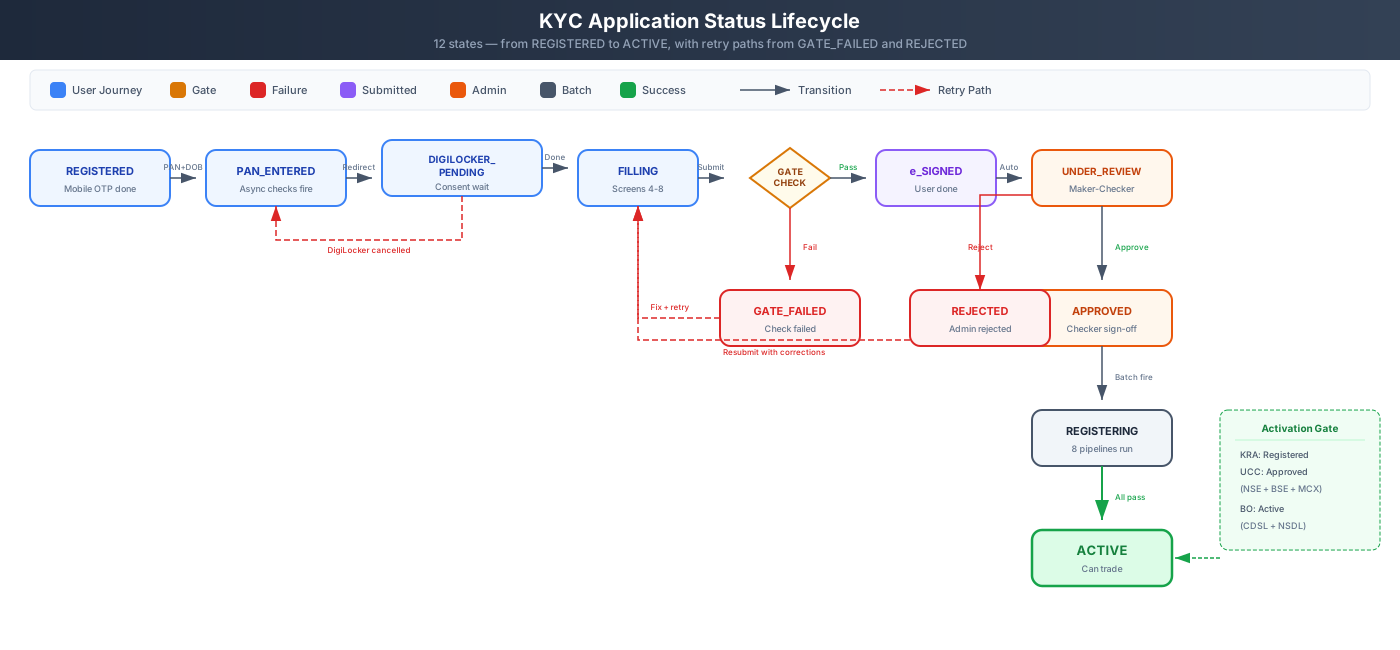
12-State Application Lifecycle — Registration to Trading
The diagram above shows the complete lifecycle. The happy path flows left to right, from REGISTERED to ACTIVE. The two terminal/blocked states — GATE_FAILED and REJECTED — have retry paths back into the flow. Let us walk through each state.
Application Status Flow
Section titled “Application Status Flow”REGISTERED → PAN_ENTERED → DIGILOCKER_PENDING → FILLING → GATE_CHECK → e_SIGNED → UNDER_REVIEW → APPROVED → REGISTERING → ACTIVETerminal/blocked states: GATE_FAILED (any blocking check fails), REJECTED (admin rejection)
The table below is the definitive reference for every status transition. Each row tells you exactly what event causes an application to move from one state to another.
Status Transitions
Section titled “Status Transitions”| From | To | Trigger |
|---|---|---|
| — | REGISTERED | Mobile OTP (One-Time Password) verified (Screen 1 complete) |
| REGISTERED | PAN_ENTERED | PAN (Permanent Account Number) + DOB (Date of Birth) submitted (Screen 2), async checks fire |
| PAN_ENTERED | DIGILOCKER_PENDING | Redirected to DigiLocker (Government of India’s digital document platform) (Screen 3) |
| DIGILOCKER_PENDING | FILLING | DigiLocker consent complete, data harvested |
| DIGILOCKER_PENDING | PAN_ENTERED | DigiLocker cancelled (retry) |
| FILLING | GATE_CHECK | Screen 8 declarations submitted |
| GATE_CHECK | e_SIGNED | Gate passed + eSign (electronic signature via Aadhaar OTP) complete (Screen 9) |
| GATE_CHECK | GATE_FAILED | Any blocking check failed |
| GATE_FAILED | FILLING | User corrects issue + retries |
| e_SIGNED | UNDER_REVIEW | Auto — enters maker-checker queue |
| UNDER_REVIEW | APPROVED | Checker approval (after maker review) |
| UNDER_REVIEW | REJECTED | Checker rejection |
| REJECTED | FILLING | User resubmits with corrections |
| APPROVED | REGISTERING | Batch pipelines fire (KRA, CKYC, UCC, BO) |
| REGISTERING | ACTIVE | KRA Registered + UCC Approved + BO Active |
Each status belongs to one of four phases. Knowing the phase helps you quickly understand where in the overall pipeline an application currently sits.
Status Descriptions
Section titled “Status Descriptions”| Status | Phase | Description |
|---|---|---|
| REGISTERED | User Journey | Mobile verified, PAN not yet entered |
| PAN_ENTERED | User Journey | Async checks (PAN, KRA, CKYC, AML) in flight |
| DIGILOCKER_PENDING | User Journey | Waiting for DigiLocker consent redirect |
| FILLING | User Journey | User completing Screens 4-8 |
| GATE_CHECK | User Journey | Blocking gate evaluation (Screen 8) |
| GATE_FAILED | User Journey | A blocking check failed — user must fix |
| e_SIGNED | Submitted | Aadhaar OTP e-Sign complete |
| UNDER_REVIEW | Admin | In maker-checker queue |
| APPROVED | Admin | Checker signed off |
| REJECTED | Admin | Checker rejected |
| REGISTERING | Batch | Agency pipelines running (KRA/CKYC/UCC/BO) |
| ACTIVE | Complete | All gates passed — can trade |
The blocking gate at Screen 8 is the most common point where applications get stuck. The table below shows each check and what the system requires before allowing the application to proceed to eSign.
Blocking Gate Checks (Screen 8)
Section titled “Blocking Gate Checks (Screen 8)”The gate evaluates these checks before allowing e-Sign:
| Check | Required Status | Source |
|---|---|---|
| PAN verification | Status = E (valid) | PAN verification API |
| PAN-Aadhaar linkage | Linked | PAN verification API |
| AML (Anti-Money Laundering) / PEP (Politically Exposed Person) screening | Completed (any result) | AML screening service |
| Bank verification | Penny drop complete | Bank verification API |
| DigiLocker consent | Data harvested | DigiLocker |
If any check hasn’t completed (timeout/error), it blocks with a specific message telling the user what needs resolution.