jx:each
jx:each is the workhorse command. It loops over a collection and repeats its template area for each item — like a for loop, but in your spreadsheet.
Syntax
Section titled “Syntax”jx:each(items="employees" var="e" lastCell="C1")Attributes
Section titled “Attributes”| Attribute | Description | Default | Required |
|---|---|---|---|
items | Expression for the collection to iterate | — | Yes |
var | Loop variable name | — | Yes |
lastCell | Bottom-right cell of the repeating area | — | Yes |
varIndex | Variable name for the 0-based index | — | No |
direction | DOWN or RIGHT | DOWN | No |
select | Filter expression (must return bool) | — | No |
orderBy | Sort spec: "e.Name ASC, e.Age DESC" | — | No |
groupBy | Property to group by | — | No |
groupOrder | Group sort: ASC or DESC | ASC | No |
multisheet | Variable with sheet names (one sheet per item) | — | No |
Basic loop
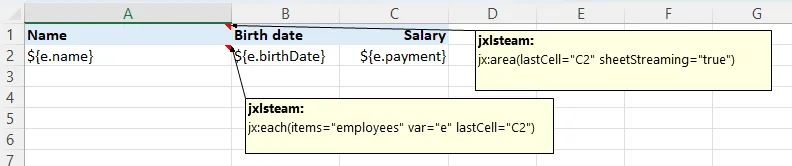
Section titled “Basic loop”The simplest and most common use case — repeat a row for each item:
Template:
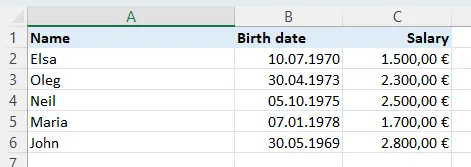
Output:
The comment on the top-left cell:
jx:area(lastCell="C2")jx:each(items="employees" var="e" lastCell="C2")Each employee produces one row. The header stays, the data row repeats, all formatting carries over.
Iteration index
Section titled “Iteration index”Need a row number? Use varIndex:
jx:each(items="employees" var="e" varIndex="i" lastCell="D1")Template:
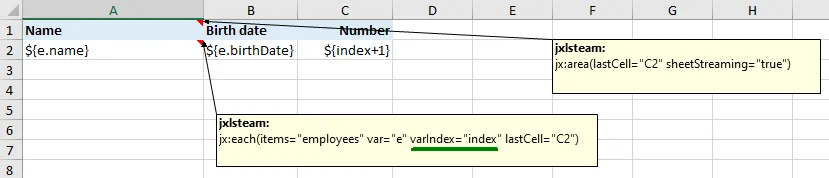
Output:
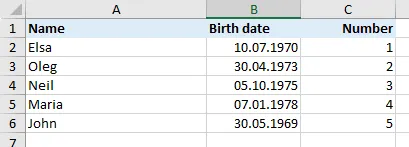
The index i is 0-based (0, 1, 2, …).
Expand RIGHT instead of DOWN
Section titled “Expand RIGHT instead of DOWN”By default, rows expand downward. Set direction="RIGHT" to expand across columns instead:
jx:each(items="months" var="m" direction="RIGHT" lastCell="A2")Template:
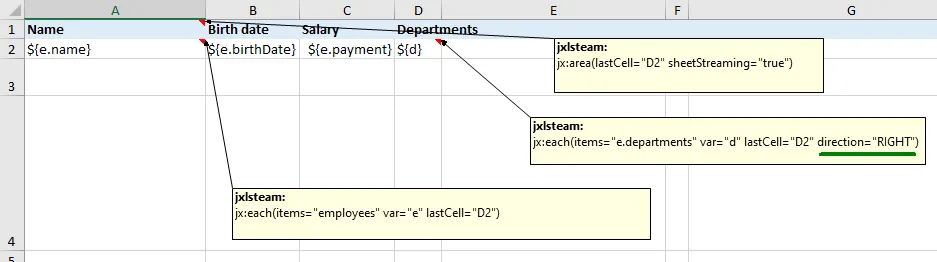
Output:

Great for time series, calendar layouts, or cross-tab reports.
Filtering with select
Section titled “Filtering with select”Only include items that match a condition:
jx:each(items="employees" var="e" select="e.payment > 2000" lastCell="C1")Template:
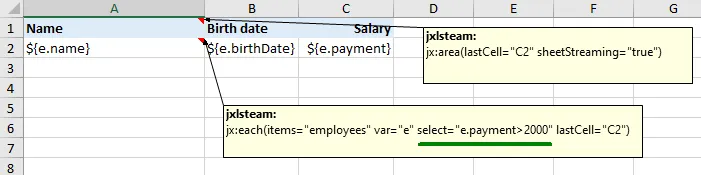
Output:
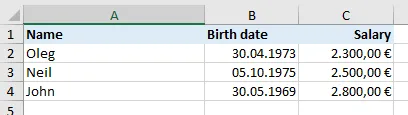
The select expression must return a boolean. Only items where it evaluates to true appear in the output.
Sorting with orderBy
Section titled “Sorting with orderBy”Sort items before looping:
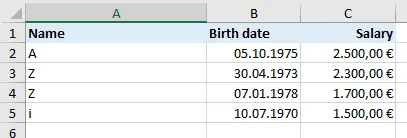
jx:each(items="employees" var="e" orderBy="e.name ASC" lastCell="C1")Template:
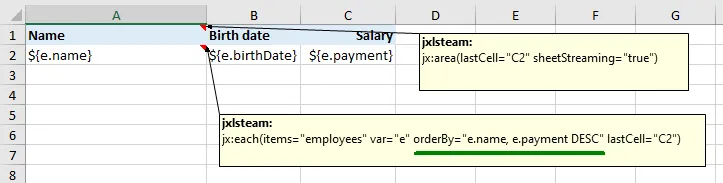
Output:
Multiple sort keys:
jx:each(items="employees" var="e" orderBy="e.department ASC, e.name DESC" lastCell="C1")Grouping with groupBy
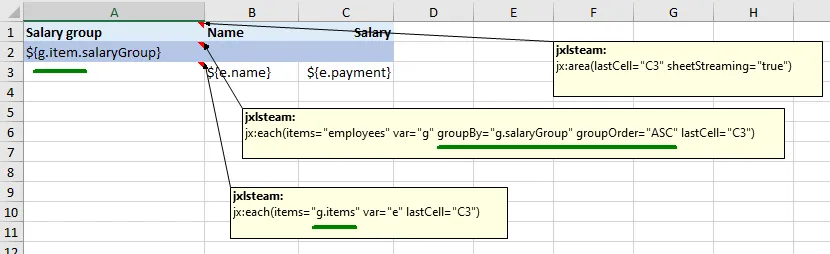
Section titled “Grouping with groupBy”Group items by a property. Each group becomes a GroupData object with Item (the key) and Items (the group members):
jx:each(items="employees" var="g" groupBy="department" groupOrder="ASC" lastCell="C5")Template:
Output:
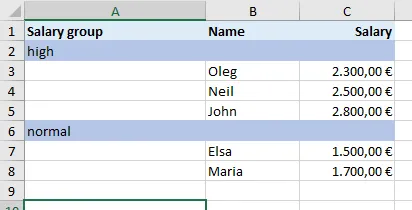
Inside the loop, g.Item is the group key (e.g., "Engineering") and g.Items is the slice of items in that group. Nest another jx:each inside to iterate over g.Items.
Multisheet mode
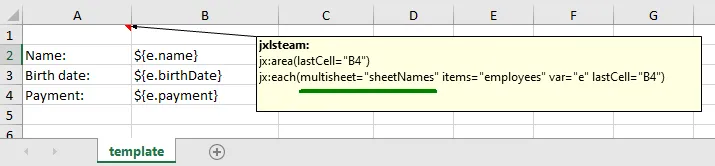
Section titled “Multisheet mode”Generate one worksheet per item using multisheet:
jx:each(items="departments" var="dept" multisheet="sheetNames" lastCell="C5")Template (single sheet serves as the template for all):
Output (one sheet per department):
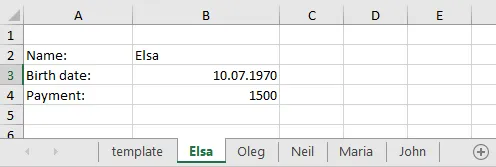
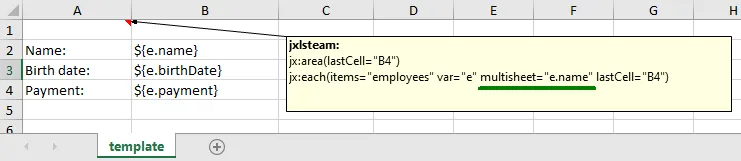
The sheetNames variable must be a []string in your data:
data := map[string]any{ "departments": departments, "sheetNames": []string{"Engineering", "Marketing", "Sales"},}The template sheet is copied for each item, then removed.
Nested loops
Section titled “Nested loops”Place an inner jx:each inside an outer one. The inner command’s area must be strictly within the outer:
Cell A1 comment:  jx:area(lastCell="C5")  jx:each(items="departments" var="dept" lastCell="C5")
Cell A2 comment:  jx:each(items="dept.Employees" var="e" lastCell="C2")
This creates a department header followed by employee rows for each department. XLFill detects the nesting automatically from the cell positions.
Try it
Section titled “Try it”Download the runnable examples from examples/xlfill-test:
| Feature | Template | Output |
|---|---|---|
| Basic loop | t01.xlsx | 01_basic_each.xlsx |
Loop index (varIndex) | t02.xlsx | 02_varindex.xlsx |
| Expand RIGHT | t03.xlsx | 03_direction_right.xlsx |
Filter (select) | t04.xlsx | 04_select.xlsx |
Sort (orderBy) | t05.xlsx | 05_orderby.xlsx |
Group (groupBy) | t06.xlsx | 06_groupby.xlsx |
| Nested loops | t13.xlsx | 13_nested_each.xlsx |
| Multi-sheet | t14.xlsx | 14_multisheet.xlsx |
See the full code snippets for each example.
Next command
Section titled “Next command”Sometimes you need to conditionally show or hide part of a template: