jx:each
jx:each is the workhorse command. It loops over a collection and repeats its template area for each item — like a for loop, but in your spreadsheet.
Syntax
Section titled “Syntax”jx:each(items="employees" var="e" lastCell="C1")Attributes
Section titled “Attributes”| Attribute | Description | Default | Required |
|---|---|---|---|
items | Expression for the collection to iterate | — | Yes |
var | Loop variable name | — | Yes |
lastCell | Bottom-right cell of the repeating area | — | Yes |
varIndex | Variable name for the 0-based index | — | No |
direction | DOWN or RIGHT | DOWN | No |
select | Filter expression (must return bool) | — | No |
orderBy | Sort spec: "e.Name ASC, e.Age DESC" | — | No |
groupBy | Property to group by | — | No |
groupOrder | Group sort: ASC or DESC | ASC | No |
multisheet | Variable with sheet names (one sheet per item) | — | No |
Basic loop
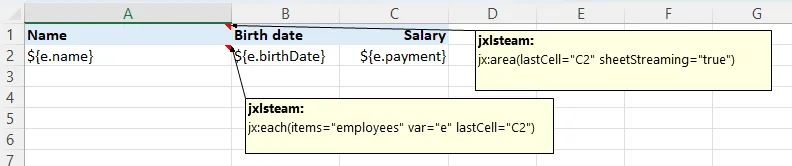
Section titled “Basic loop”The simplest and most common use case — repeat a row for each item:
Template:
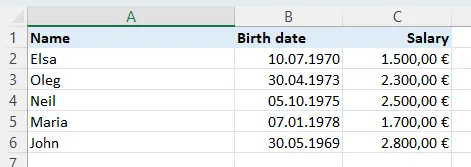
Output:
The comment on the top-left cell:
jx:area(lastCell="C2")jx:each(items="employees" var="e" lastCell="C2")Each employee produces one row. The header stays, the data row repeats, all formatting carries over.
Iteration index
Section titled “Iteration index”Need a row number? Use varIndex:
jx:each(items="employees" var="e" varIndex="i" lastCell="D1")Template:
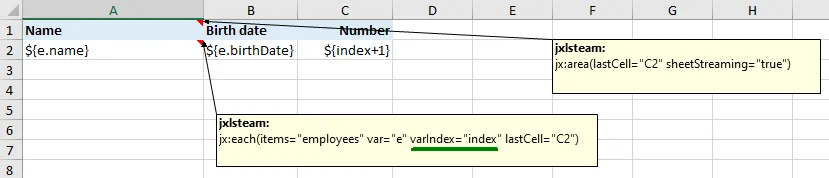
Output:
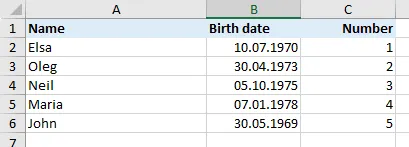
The index i is 0-based (0, 1, 2, …).
Expand RIGHT instead of DOWN
Section titled “Expand RIGHT instead of DOWN”By default, rows expand downward. Set direction="RIGHT" to expand across columns instead:
jx:each(items="months" var="m" direction="RIGHT" lastCell="A2")Template:
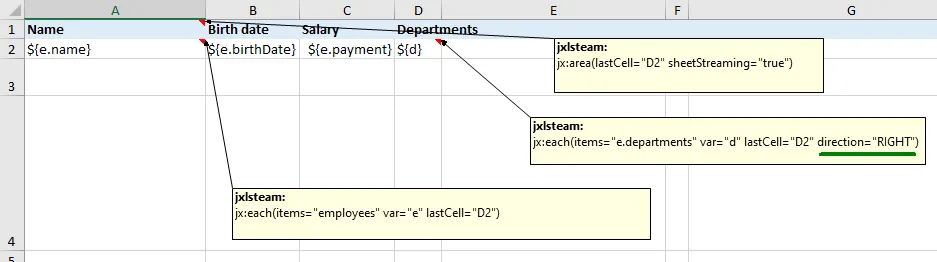
Output:

Great for time series, calendar layouts, or cross-tab reports.
Filtering with select
Section titled “Filtering with select”Only include items that match a condition:
jx:each(items="employees" var="e" select="e.payment > 2000" lastCell="C1")Template:
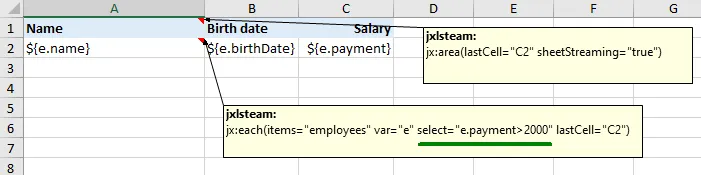
Output:
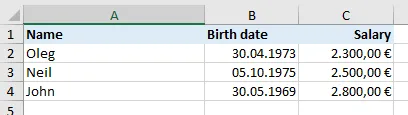
The select expression must return a boolean. Only items where it evaluates to true appear in the output.
Sorting with orderBy
Section titled “Sorting with orderBy”Sort items before looping:
jx:each(items="employees" var="e" orderBy="e.name ASC" lastCell="C1")Template:
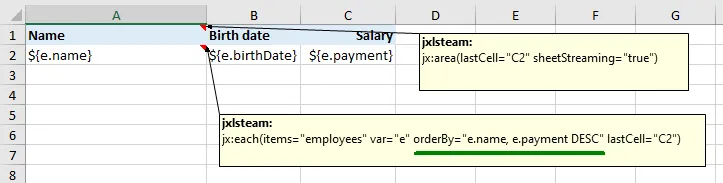
Output:
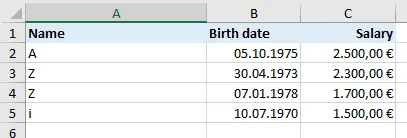
Multiple sort keys:
jx:each(items="employees" var="e" orderBy="e.department ASC, e.name DESC" lastCell="C1")Grouping with groupBy
Section titled “Grouping with groupBy”Group items by a property. Each group becomes a GroupData object with Item (the key) and Items (the group members):
jx:each(items="employees" var="g" groupBy="department" groupOrder="ASC" lastCell="C5")Template:
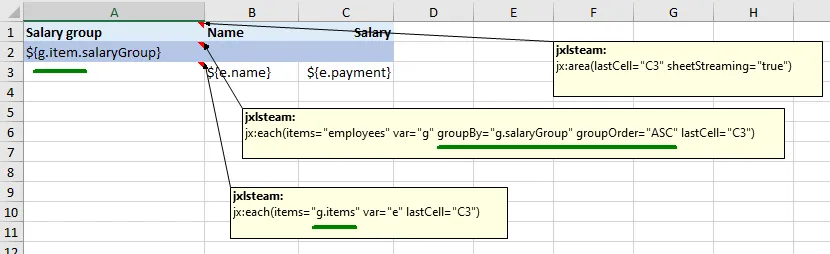
Output:
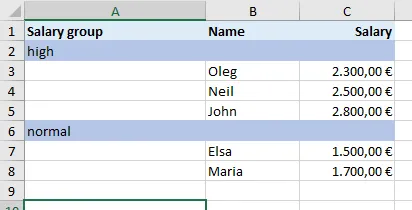
Inside the loop, g.Item is the group key (e.g., "Engineering") and g.Items is the slice of items in that group. Nest another jx:each inside to iterate over g.Items.
Multisheet mode
Section titled “Multisheet mode”Generate one worksheet per item using multisheet:
jx:each(items="departments" var="dept" multisheet="sheetNames" lastCell="C5")Template (single sheet serves as the template for all):
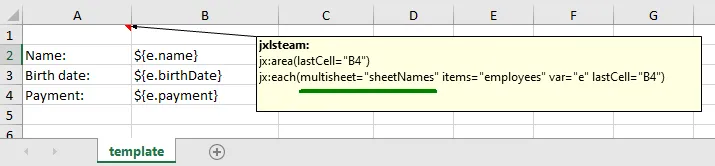
Output (one sheet per department):
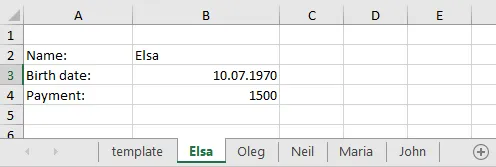
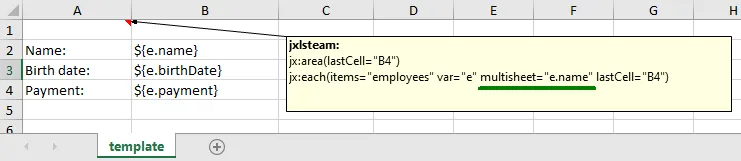
The sheetNames variable must be a []string in your data:
data := map[string]any{ "departments": departments, "sheetNames": []string{"Engineering", "Marketing", "Sales"},}The template sheet is copied for each item, then removed.
Nested loops
Section titled “Nested loops”Place an inner jx:each inside an outer one. The inner command’s area must be strictly within the outer:
Cell A1 comment:  jx:area(lastCell="C5")  jx:each(items="departments" var="dept" lastCell="C5")
Cell A2 comment:  jx:each(items="dept.Employees" var="e" lastCell="C2")
This creates a department header followed by employee rows for each department. XLFill detects the nesting automatically from the cell positions.
Common pitfalls
Section titled “Common pitfalls”itemsisn’t a slice. XLFill errors ifitemsresolves to a non-iterable (number, string, map). For an empty case, pass[]any{}from Go — the loop produces zero rows without error.varcollides with a top-level data key. Inside the loop, the loop variable shadows the data key. Outside the loop, the data key is visible. Use distinct names to avoid confusion.lastCellis the one-iteration template, not the full output. If your iteration row is row 3,lastCell="C3"is correct — XLFill expands it as iterations multiply.lastCell="C100"would interpret rows 3-100 as a single iteration’s template, which is almost never what you want.direction="RIGHT"with content below. Right-expansion shifts columns right; content directly below the iteration cell stays put. Plan your layout so nothing sits where columns will expand.selectfilters before sort. If you want “top 5 by salary”, combineselect+orderBy+ an outer slicing in Go (the engine doesn’t natively support LIMIT).multisheetdeletes the template sheet. That’s by design — but if your workbook has multiple sheets and only one is the multisheet template, the others survive untouched.- Nested each detection is positional. The inner each’s
lastCellmust be strictly inside the outer’s area. If they overlap or touch, the engine may treat them as siblings.
Try it
Section titled “Try it”Download the runnable examples from examples/xlfill-test:
| Feature | Template | Output |
|---|---|---|
| Basic loop | t01.xlsx | 01_basic_each.xlsx |
Loop index (varIndex) | t02.xlsx | 02_varindex.xlsx |
| Expand RIGHT | t03.xlsx | 03_direction_right.xlsx |
Filter (select) | t04.xlsx | 04_select.xlsx |
Sort (orderBy) | t05.xlsx | 05_orderby.xlsx |
Group (groupBy) | t06.xlsx | 06_groupby.xlsx |
| Nested loops | t13.xlsx | 13_nested_each.xlsx |
| Multi-sheet | t14.xlsx | 14_multisheet.xlsx |
See the full code snippets for each example.
Next command
Section titled “Next command”Sometimes you need to conditionally show or hide part of a template: