Formulas
One of the most powerful features of the template-first approach: formulas just work. You write them in your template like normal Excel formulas, and XLFill automatically updates cell references when rows or columns are inserted.
Automatic formula expansion
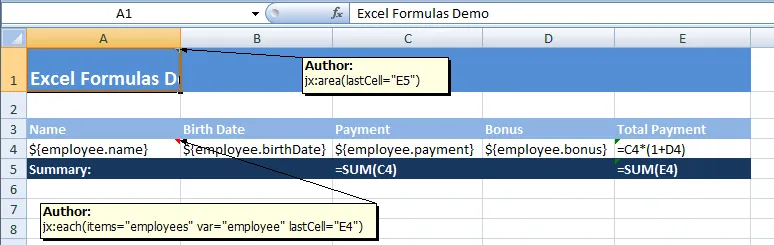
Section titled “Automatic formula expansion”When a jx:each command inserts new rows, any formula that references cells in the expanded area is automatically updated.
Template:
Output:
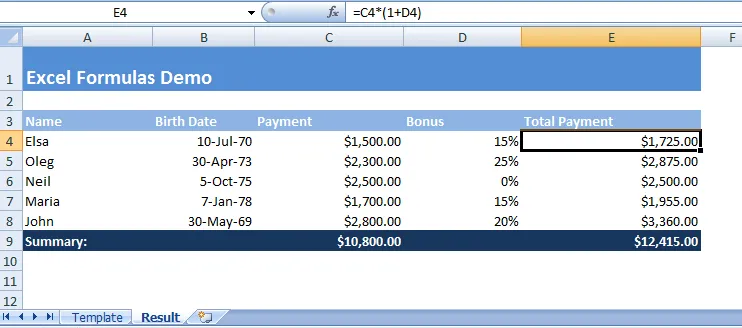
A formula like =SUM(B2:B2) in the template expands to =SUM(B2:B6) when 5 data rows are generated. You don’t write any code for this — it happens automatically.
Why this matters
Section titled “Why this matters”With hard-coded Excel libraries, you’d have to:
- Count how many rows were inserted
- Manually construct the formula string:
fmt.Sprintf("=SUM(B2:B%d)", lastRow) - Write it to the cell
- Hope you got the reference right
With XLFill, you write the formula once in the template and forget about it.
Formulas with grouped data
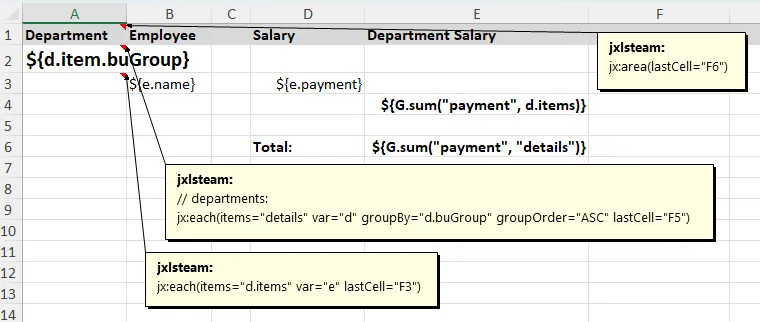
Section titled “Formulas with grouped data”Formulas work beautifully with grouped data. Here’s a report with subtotals per group:
Template:
Output:
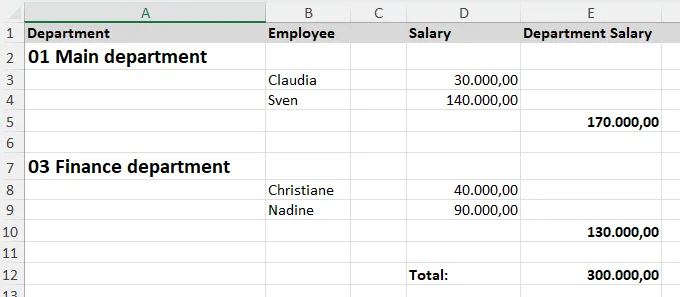
Each group’s SUM formula correctly references only the rows in that group.
Parameterized formulas
Section titled “Parameterized formulas”Sometimes you need dynamic values inside formulas — a tax rate, a discount percentage, a bonus amount. Use ${...} expressions inside formula cells:
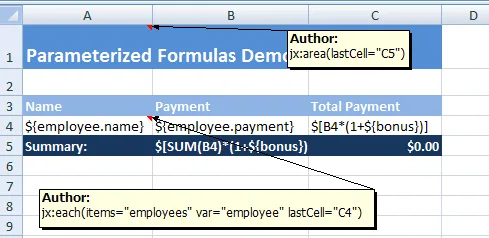
=A1*${taxRate} → =A1*0.2=A1*${rate}+${bonus} → =A1*0.1+500The ${...} parts are resolved from your data context, and the result is a real Excel formula (not a static value). This means Excel will recalculate it when the file is opened.
data := map[string]any{ "employees": employees, "taxRate": 0.2, "bonus": 500,}Recalculate on open
Section titled “Recalculate on open”By default, Excel caches formula results. If you want Excel to recalculate everything when the file is opened (ensuring fresh values), enable this option:
xlfill.Fill("template.xlsx", "output.xlsx", data, xlfill.WithRecalculateOnOpen(true),)This sets a flag in the file that tells Excel: “recalculate all formulas when you open this.”
Try it
Section titled “Try it”Download the runnable example: template t08.xlsx | output 08_formulas.xlsx | code snippet
What’s next?
Section titled “What’s next?”If you need to extend XLFill with your own template commands:
Or if you want to hook into cell processing for conditional styling: