Why XLFill?
Let’s be honest. If you’ve ever generated Excel files from Go, you’ve probably had that moment. The one where you’re 150 lines deep into setting cell borders, and someone walks over and says, “Hey, can we make the header blue instead of green?”
And you think: I have to redeploy for this.
There’s a better way. Let’s look at both approaches side by side.
The hard-coded approach (what most of us have been doing)
Section titled “The hard-coded approach (what most of us have been doing)”Here’s a real-world Go program that generates a simple 3-column employee report. Just three columns. Nothing fancy:
f := excelize.NewFile()sheet := "Report"f.NewSheet(sheet)
// Set column widths manuallyf.SetColWidth(sheet, "A", "A", 20)f.SetColWidth(sheet, "B", "B", 10)f.SetColWidth(sheet, "C", "C", 25)
// Create header styleheaderStyle, _ := f.NewStyle(&excelize.Style{    Font:      &excelize.Font{Bold: true, Size: 12, Color: "FFFFFF"},    Fill:      excelize.Fill{Type: "pattern", Color: []string{"4472C4"}, Pattern: 1},    Alignment: &excelize.Alignment{Horizontal: "center"},    Border: []excelize.Border{        {Type: "left", Color: "000000", Style: 1},        {Type: "top", Color: "000000", Style: 1},        {Type: "right", Color: "000000", Style: 1},        {Type: "bottom", Color: "000000", Style: 1},    },})
// Write headersf.SetCellValue(sheet, "A1", "Name")f.SetCellValue(sheet, "B1", "Age")f.SetCellValue(sheet, "C1", "Department")f.SetCellStyle(sheet, "A1", "C1", headerStyle)
// Create data styledataStyle, _ := f.NewStyle(&excelize.Style{    Border: []excelize.Border{        {Type: "left", Color: "000000", Style: 1},        {Type: "top", Color: "000000", Style: 1},        {Type: "right", Color: "000000", Style: 1},        {Type: "bottom", Color: "000000", Style: 1},    },})
// Write rowsfor i, emp := range employees {    row := i + 2    f.SetCellValue(sheet, fmt.Sprintf("A%d", row), emp.Name)    f.SetCellValue(sheet, fmt.Sprintf("B%d", row), emp.Age)    f.SetCellValue(sheet, fmt.Sprintf("C%d", row), emp.Department)    f.SetCellStyle(sheet, fmt.Sprintf("A%d", row), fmt.Sprintf("C%d", row), dataStyle)}
f.SaveAs("output.xlsx")
40+ lines. For three columns. And honestly? The output still looks mediocre. No alternating row colors. No conditional formatting. No print-ready margins. Now picture a real report — merged headers, subtotals, logos, multiple sections. You can feel the pain already.
Sound familiar?
Section titled “Sound familiar?”- “Can we change the header color?” — Sure, let me edit Go code, rebuild, test, deploy…
- “The finance team designed a new layout in Excel.” — Great, now I get to reverse-engineer every pixel into struct literals.
- “We need one more column.” — Time to update every cell reference, every style range, every
fmt.Sprintf. - “The numbers should have two decimal places.” — Let me look up the excelize number format codes again…
The fundamental problem? The layout is trapped inside your code. And code is the worst possible place to describe how a spreadsheet should look.
What if the spreadsheet editor was your design tool?
Section titled “What if the spreadsheet editor was your design tool?”That’s the core insight behind XLFill. It’s a Go library that flips the approach: you don’t describe how a report looks in code. You design it where it belongs — in a spreadsheet editor — and the library fills it with your data.
Step 1: Make it look right in Excel
Section titled “Step 1: Make it look right in Excel”Open Excel, Google Sheets, LibreOffice — whatever you like. Design your report. Make it beautiful. Spend two minutes getting the fonts right instead of twenty minutes writing style structs:
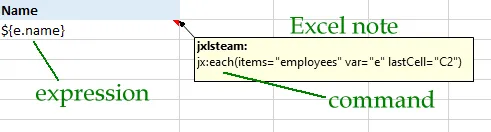
See those ${e.name} placeholders? Those are expressions — they tell XLFill where to put data. The jx:each(...) in the cell comment? That tells XLFill to repeat this row for each item. That’s the entire template language.
Step 2: Fill it from Go
Section titled “Step 2: Fill it from Go”data := map[string]any{ "employees": employees,}
xlfill.Fill("template.xlsx", "output.xlsx", data)Three lines. The same report that took 40+ lines of hard-coded cell manipulation. And it looks better, because you designed it in a proper spreadsheet editor instead of guessing at color hex codes in Go structs.
The result speaks for itself
Section titled “The result speaks for itself”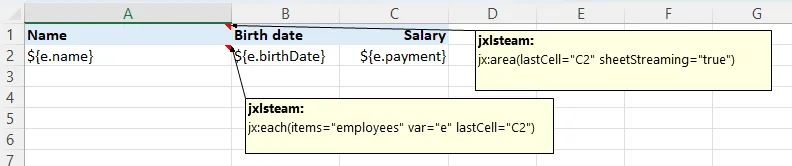
Becomes:
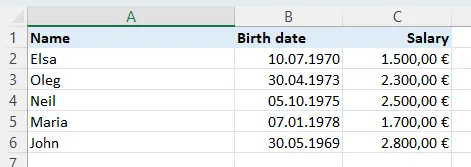
Every font, every color, every border, every number format — carried over automatically. You didn’t write a single line of styling code.
What changes in your workflow
Section titled “What changes in your workflow”This isn’t just a different library. It’s a different way of working.
Before XLFill:
- Finance team designs a report in Excel and sends you a screenshot
- You spend hours translating every visual detail into Go code
- Something looks slightly off. You tweak, rebuild, compare, repeat.
- A month later, they want changes. Back to step 2.
After XLFill:
- Finance team designs a report in Excel
- You add a few
${...}placeholders and ajx:eachcomment. Ten minutes. - Your Go code provides the data. Three lines.
- A month later, they want changes. They update the template themselves. You don’t even hear about it.
The template is the single source of truth for design. Your code is the single source of truth for data. Nobody steps on each other’s toes.
Who is this for?
Section titled “Who is this for?”You’ll love XLFill if you:
- Generate Excel reports, invoices, statements, or data exports from a Go app
- Have business users who care about how reports look (spoiler: they always do)
- Are tired of wrestling with cell-by-cell styling code
- Want non-developers to own the report layout
- Need formulas, merged cells, images, or complex formatting that’s painful to hard-code
You probably don’t need XLFill if:
- You’re dumping plain data into a CSV — no formatting needed
- Your output is a few cells with zero visual design requirements
Built on battle-tested foundations
Section titled “Built on battle-tested foundations”XLFill is a Go library — a port of JXLS 3.0, the Java Excel template engine that’s been used in enterprise applications for over a decade. Banks, insurance companies, government agencies — JXLS has powered their reports for years. Same proven template syntax, same powerful command set, reimplemented as a clean, idiomatic Go module you go get into your project.
Ready to try it?
Section titled “Ready to try it?”It takes about five minutes to go from zero to a working report. No complicated setup. No boilerplate. Just a template and a few lines of Go.